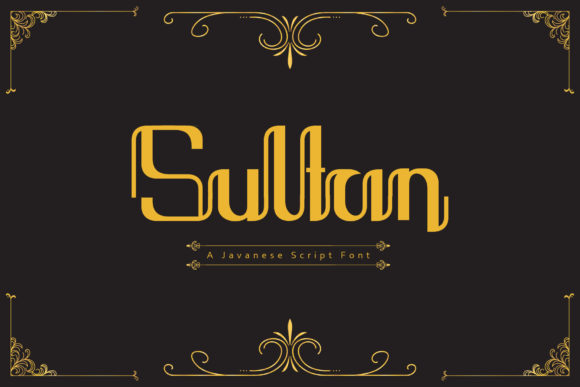
Sultan Display Font for Handmade Creators
As someone who designs printable wall art, hand-poured candle labels, and wedding invitation suites — all while juggling Cricut cuts, Silhouette exports, and Etsy mockups — I know how much a single font can shift the entire feel of a product. Sultan isn’t just another display font. It’s that rare balance of cool confidence and quiet elegance — clean enough for modern boutiques, warm enough for farmhouse markets, and distinctive enough to stand out in a crowded digital download shop.
Visually, Sultan has a refined presence: subtle contrast between thick and thin strokes, gently flared terminals, and a rhythm that feels intentional without being fussy. It’s not overly ornate — no distracting swashes or exaggerated flourishes — but it carries personality. That makes it incredibly versatile across physical and digital craft applications where clarity and charm must coexist.
Where Sultan Shines in Real Craft Projects
I reach for Sultan when I need a font that works *for* the product — not just on it. For example:
- Candle & soap labels: Sultan reads beautifully at 10–14 pt on 2” x 1” kraft tags. Its open letterforms hold up well when printed on textured paper or cut with a Cricut Fine-Point Blade.
- Wedding welcome signs and seating charts: Paired with a soft serif like Playfair Display or a minimal sans like Montserrat, Sultan adds sophistication without overwhelming delicate florals or neutral palettes.
- Digital printables and planner inserts: Because Sultan is designed as a display font, it performs best for headings, section dividers, and cover titles — not body text. I use it for “Monthly Focus,” “Gratitude Journal,” or “Meal Planner” headers, then switch to a legible sans for checklists and notes.
- SVG cut files and iron-on transfers: The clean outlines and consistent stroke weight mean fewer cutting errors on vinyl or heat-transfer material. I’ve used it successfully for tote bag quotes (“Good Vibes Only”), mug decals (“Brewed with Love”), and seasonal market signs (“Pumpkin Spice & Everything Nice”).
- Holiday packaging and boutique gift tags: Sultan’s warmth makes it ideal for Christmas, Easter, and baby shower collections. It reads clearly even when scaled down to 8 pt on 1.5” square hang tags — especially when exported as vector outlines before cutting.
Readability & Production Tips You’ll Actually Use
Here’s what I’ve learned from testing Sultan across real production scenarios:
- For small stickers (under 1.25”): Stick to 3–4 word phrases — “Hand Poured,” “Locally Made,” “Small Batch.” Avoid lowercase ‘a’, ‘e’, or ‘s’ in tight spaces; their counters can fill in during printing or cutting.
- On dark backgrounds: Sultan holds contrast well, but I always test a white or light cream stroke (1 pt) around letters when using it on navy, charcoal, or deep green packaging.
- In mockups: It renders crisply in Canva, Adobe Illustrator, and Cricut Design Space — no pixelation, even at large sizes. Just remember to convert to outlines before exporting SVGs for commercial use.
- For seasonal collections: Sultan’s neutrality means it transitions effortlessly — no need to swap fonts between spring florals and fall harvest themes. A single license covers year-round use across your product line.
Smart Pairings That Keep Your Brand Cohesive
Sultan thrives alongside complementary typefaces — not competitors. Think of it as the statement piece in your typography toolkit. Try these pairings in your templates and product listings:
- Sultan + Lora (serif): Perfect for wedding stationery — Sultan for “Mr. & Mrs.”, Lora for names and RSVP details. Both share classical roots but different weights and moods.
- Sultan + Raleway (sans serif): Ideal for modern boutique packaging. Use Sultan for the brand name on a jar label, Raleway for ingredients and net weight.
- Sultan + Pacifico (script): A thoughtful combo for greeting cards — Sultan as the headline (“You’re Amazing”), Pacifico for the handwritten-style sentiment inside. Just keep script usage minimal to preserve readability.
Always test spacing. Sultan’s generous x-height and moderate width mean it pairs best with fonts that don’t compete for visual attention. If your pairing feels “busy,” simplify — one expressive font per layout is usually enough.
Licensing, Formats, and What You Need to Know
Sultan is a premium display font built for creators who sell — not just design. Its commercial license covers physical products (stickers, mugs, apparel), digital downloads (PDF planners, Canva templates), SVG files for cutting machines, and client work (like custom invitation suites). No hidden restrictions — just straightforward rights that align with how handmade sellers actually operate.
The file package includes OTF and TTF formats — both work reliably in Cricut Design Space, Silhouette Studio, Adobe apps, and free tools like Inkscape. While Sultan doesn’t include multilingual glyphs or stylistic alternates, its core character set is complete for English, Spanish, French, and German — enough for most small-batch labels, tags, and seasonal collections.
One practical note: Always embed Sultan in PDF printables or outline it in SVGs before selling. This ensures your buyers see exactly what you intended — no font substitution surprises on their end.
Whether you’re designing a single holiday sticker pack or building a full brand identity for your handmade apothecary, Sultan delivers more than style. It delivers consistency, confidence, and quiet professionalism — the kind customers notice before they even read the words.